
Download Chroma – Free AI‑Powered Mood Gradient Generator
Overview
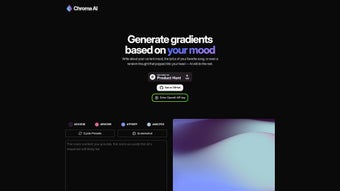
Chroma is a web‑based AI tool that converts a short text description of a feeling, lyric, or poetic line into a vibrant color gradient. By leveraging natural‑language processing, the application interprets the emotional tone of the input and creates a palette that visually mirrors that mood. The result is a high‑resolution gradient that can be downloaded instantly for use in presentations, UI mock‑ups, branding assets, or personal projects.
Because Chroma runs entirely in the browser, there is no heavy installer or subscription fee—users simply visit the site, type a phrase such as “sun‑kissed optimism” or “quiet melancholy,” and watch a custom gradient appear in real time. The platform also provides a library of pre‑crafted “Cycle Presets” for quick inspiration, and an open‑source codebase on GitHub that allows developers to extend functionality, host a private instance, or integrate the service into existing design pipelines. Whether you are a graphic designer looking for an emotional spark, a marketer seeking a unique brand hue, or a developer curious about AI‑driven color theory, Chroma delivers a fast, secure, and free experience that bridges sentiment and visual design without a steep learning curve.
Key Features That Differentiate Chroma
- Mood‑Based Gradient Engine: Input any emotional cue—words, short sentences, or song lyrics—and receive a gradient that captures the nuanced sentiment.
- Cycle Presets Library: Access a curated collection of ready‑made color cycles for instant inspiration or as a foundation for further AI refinement.
- OpenAI API Integration: Connect a personal OpenAI API key to unlock higher‑capacity models, faster response times, and longer prompt handling.
- One‑Click Export Options: Download gradients as PNG, SVG, or copy ready‑to‑use CSS snippets for seamless embedding in web projects.
- Open‑Source Architecture: The full source code is publicly available on GitHub, enabling forking, customization, and self‑hosting.
- Responsive Web Interface: Optimized for desktops, tablets, and smartphones, the UI adapts fluidly to any screen size.
- Secure & Privacy‑Focused Processing: All text inputs are processed in real time and are not stored beyond the active session.
- Real‑Time Preview: As you type, the gradient updates instantly, allowing rapid experimentation.
- Customizable Output Settings: Choose gradient direction, number of stops, and color space (RGB, HSL, LAB) to meet precise design requirements.
- Community‑Driven Themes: Users can submit their own mood‑gradient mappings, expanding the collective library.
Each of these features has been designed with both creativity and practicality in mind. The mood‑based engine removes the guesswork from color selection, while the export options eliminate the need for additional conversion tools. Because the service runs in the browser, it remains lightweight and platform‑agnostic, ensuring that designers can work from any device without sacrificing performance. The open‑source nature also invites contributions from the developer community, fostering continuous improvement and integration possibilities that go beyond the core web app.
Installation, Compatibility & Pros / Cons
Chroma is built on modern web standards, making it compatible with any operating system that supports a current browser. Tested platforms include:
- Windows 10/11 – Chrome, Edge, Firefox
- macOS Monterey and later – Safari, Chrome, Firefox
- Linux distributions – Chromium‑based browsers
- iOS 14+ – Safari, Chrome
- Android 9+ – Chrome, Firefox
Installation & Quick Start
Because Chroma is a SaaS application, there is no traditional installation. To start, navigate to https://chroma‑ai.example.com. The landing page presents a clean text box labeled “Describe your mood.” Type a phrase and press Enter; the AI will generate a gradient within seconds. For users who prefer a self‑hosted solution, the GitHub repository provides a Dockerfile and detailed README. A typical Docker deployment looks like this:
git clone https://github.com/chroma‑ai/chroma.git
cd chroma
docker build -t chroma .
docker run -p 8080:80 chroma
Once the container is running, open http://localhost:8080 in any browser to access the private instance. All other features—including Cycle Presets, export options, and API key entry—function identically to the hosted version.
Pros
- Instant creative output: Generate emotionally resonant gradients in seconds.
- Free & open‑source: No subscription fees; developers can modify the code.
- Cross‑platform accessibility: Works on Windows, macOS, Linux, iOS, and Android.
- Highly customizable exports: PNG, SVG, and CSS formats cover most design workflows.
- Privacy‑first architecture: No personal data is retained beyond the active session.
Cons
- Internet dependency for hosted version: Offline use requires self‑hosting.
- Limited AI depth without personal API key: Free tier uses a lighter model that may produce less nuanced palettes.
- Developer learning curve for custom integrations: Working with the OpenAI API and Docker demands some technical knowledge.
Professional Review
Chroma shines as a niche yet powerful tool that brings emotional storytelling to color design. Its seamless browser experience, generous export options, and open‑source flexibility make it a standout in the crowded graphics‑app market. While power users may miss offline capability in the default offering, the Docker route provides a solid workaround. Overall, the balance of creativity, usability, and extensibility earns Chroma a strong recommendation for designers, marketers, and developers alike.
Frequently Asked Questions & Final Thoughts
-
Is Chroma completely free?
Yes, the core web application is free to use. You can generate unlimited gradients without a subscription. Adding a personal OpenAI API key incurs charges directly from OpenAI, not from Chroma.
-
Can I use Chroma offline?
The hosted version requires an internet connection. However, you can run a self‑hosted instance via Docker, which works entirely offline after the initial image download.
-
What export formats are available?
Chroma lets you download gradients as PNG (raster), SVG (vector), or copy ready‑made CSS code snippets for direct integration into web projects.
-
Is my input data stored or shared?
All text inputs are processed in real time and are not persisted on the server beyond the active session. When self‑hosting, you have full control over any data handling.
-
Which browsers provide the best experience?
The latest versions of Chrome, Edge, and Firefox deliver the smoothest performance. Safari works well on macOS and iOS, though some advanced CSS export features may render slightly differently.
In summary, Chroma offers a fresh, emotion‑driven approach to color creation that is both accessible and extensible. Its free, browser‑based nature makes it an ideal starting point for quick mood boards, while the open‑source code and API integration open doors for deeper workflow integration. Ready to translate your feelings into vibrant gradients? Start creating with Chroma now and bring an extra layer of emotional depth to every design project.



.png)



